English


Microsoft Rewards and Robux on Roblox!

Here's how to view your Roblox digital card in Microsoft Rewards and redeem the code if the offer is available in your account.
Robux is one of the goals many Roblox players strive for. This virtual currency allows players to buy accessories, customize their avatars, and enjoy exclusive features in various experiences.
We've compiled the main options and explained what you need to know before investing your time or money. If you already use Microsoft Rewards, first check out how to view your Roblox digital card.
Robux and Microsoft Rewards
1. View your Roblox card in Microsoft Rewards
Microsoft Rewards is Microsoft's points program. You can earn points through eligible activities, such as searching on Bing, based on the options displayed on the dashboard. Microsoft lists a Roblox digital gift card, and the available offers vary by account and region.
- Go to the Microsoft Rewards dashboard and sign in to the Microsoft account where you earn points.
- Open the section Rescue and search for Roblox Digital Card in the catalog.
- If the card appears, check how many Robux the option offers, how many points it requires, and whether you have enough in your balance.
- Confirm the redemption of points for the card and complete the verification process requested by Microsoft, if applicable.
- Open the Order History from Microsoft Rewards. Locate the card and view the order details to get the code or redemption link.
- In your browser, open the official Roblox redemption page. Make sure you're logged into the account that should receive the Robux, enter the code, and confirm. Wait for the confirmation message and check your balance.
If the card doesn't appear, the offer may not be available for your account or region at this time. Check the catalog for the region where you enrolled in the program. If you've already placed your order and haven't received the confirmation email, use the resend option in your Microsoft Rewards history.
See the Roblox digital gift card page, the point redemption rules, and Microsoft's guidelines for locating the gift card code.
2. Buy Robux through official channels
If you need coins quickly and don't want to rely on sales or game development, the official purchase is the most direct route.
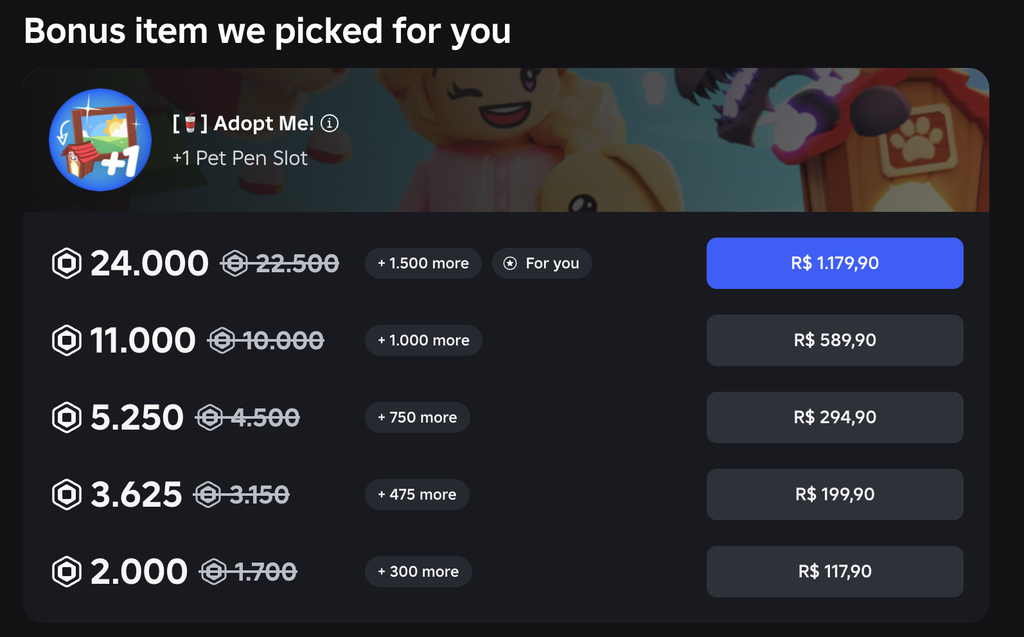
Roblox sells Robux packages through the browser, the app, and on compatible consoles. According to the platform, purchases made online, on a computer, or with gift cards can offer up to 25% more Robux. Before finalizing your purchase, compare the price and amount of Robux, review the payment terms, and decide how much you want to spend. Check the official purchase page and Roblox’s explanation of the available options.
3. Create and sell items for avatars
If you enjoy drawing, designing clothes, or working with 3D models, you can turn that skill into an opportunity on Roblox. When someone buys an item you’ve published, a portion of the revenue goes to the creator. The percentage depends on the type of item and how the sale was made.
Before you begin, check the requirements for your account and the type of item. Roblox may require identity verification, an eligible subscription, and Robux fees. For 3D accessories and clothing, the process typically follows these steps.
- Create the item and prepare the file according to Roblox's specifications.
- Submit the item through Roblox Studio for validation and moderation.
- After approval, set up the listing and make the item available for sale once the requirements have been met.
Please review the publishing guide, the Marketplace rules, and the documentation on fees and commissions before investing in the item.
4. Develop games and experiences
Roblox Studio is the environment used to develop experiences. With it, you can create maps, challenges, progression systems, and activities for other players. After publishing a game, you can offer passes, consumable items, or recurring perks.
- Game passes are purchased once and can grant privileges, such as access to a special area.
- Developer products can be purchased multiple times, such as in-game currency or consumable items.
- Subscriptions provide access to benefits as long as they are active.
How Creator Rewards Works
Creator Rewards replaced the engagement-based and affiliate programs on July 24, 2025. It offers rewards to creators for daily engagement and for the arrival or return of eligible players to the platform.
As part of the daily engagement reward, the creator can receive 5 Robux when the match is one of the top three in which an eligible player accumulates at least 10 minutes that day. Roblox calls this player a Active Spender. To qualify, players must have made at least $9.99 in eligible purchases on Roblox in the past 60 days. This rule excludes new or reactivated users during that same period.
For audience expansion, the rule provides for a 35% share on up to $100 in eligible purchases per player during the first 60 days. The player must be new to Roblox or have returned to the platform and play for at least 10 minutes on the day of sign-up or return. The platform also applies rules for attributing the visit to the creator. Requirements include a creator account in good standing with verified identity and an average of at least 100 active users per day in the experience during the 60 days following the player’s sign-up or return.
Rewards are paid out in earned Robux and are subject to a 60-day holding period. For audience growth, the terms of the Developer Exchange (DevEx) program also apply. See the full terms and conditions in the official Creator Rewards documentation.
5. Resell or trade collectibles
Selling an eligible item can earn you Robux when another player buys it. The price depends on demand, and fees may apply. In the trading system, players trade eligible items, such as those marked as Limited or Limited U, and may include Robux to balance the supply.
To trade, you need to have an eligible item and find someone interested. When the trade involves Robux, Roblox deducts a 30% fee from that amount. Check the requirements for age verification, subscription, region, and account settings. Since completed trades are final, review the items and amounts carefully and conduct the trade through the official system. See the trading rules.
Which method is more worthwhile?
The best option depends on your goal and how much time you plan to spend on Roblox. If you’re already earning points through Microsoft Rewards, start by checking to see if the card is listed in the catalog. If you’d rather buy Robux, compare the official bundles. If you want to create items or games, check the fees and requirements before investing in the project.